OpenTelemetry
This guide covers OpenTelemetry integration in AdonisJS applications. You will learn how to:
- Install and configure the
@adonisjs/otelpackage - Understand traces, spans, and attributes
- Use automatic instrumentation for HTTP, database, and Redis
- Create custom spans with helpers and decorators
- Propagate trace context across services
- Test your setup locally with Jaeger
Overview
OpenTelemetry is an open standard for collecting telemetry data from your applications: traces, metrics, and logs. The @adonisjs/otel package provides a seamless integration between AdonisJS and OpenTelemetry, giving you distributed tracing and automatic instrumentation with sensible defaults.
Observability is essential for understanding what happens inside your application, especially in production. When a user reports that "the checkout page is slow," tracing lets you see exactly where time is spent. Was it the database query? An external API call? A slow service? Without tracing, you're left guessing.
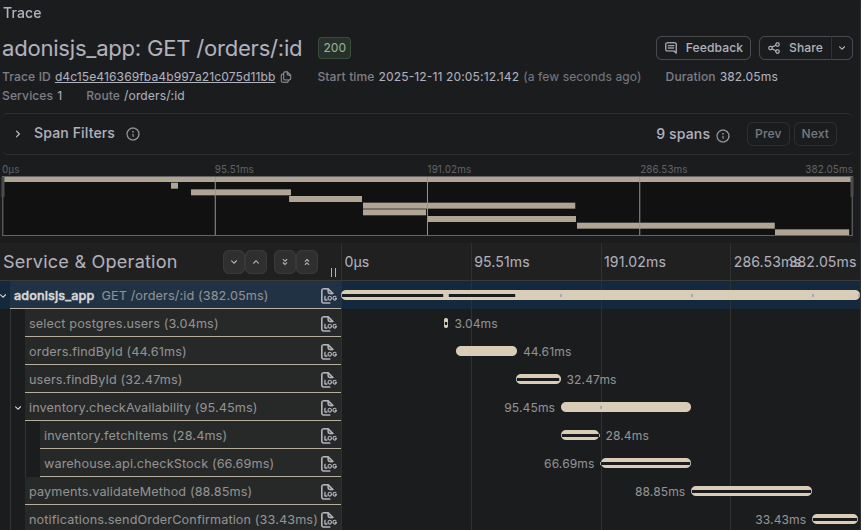
This package handles the complexity of OpenTelemetry setup for you. Run a single command, and your application automatically traces HTTP requests, database queries, Redis operations, and more.
OpenTelemetry concepts
Before diving into the implementation, you should understand a few core OpenTelemetry concepts. For a comprehensive introduction, see the official OpenTelemetry documentation .
A trace represents the complete journey of a request through your system. When a user hits your API, the trace captures everything that happens: the HTTP request, database queries, cache lookups, calls to external services, and the response.
A span is a single unit of work within a trace. Each database query, HTTP request, or function call can be a span. Spans have a start time, duration, name, and attributes (key-value metadata). Spans are nested hierarchically: a parent span for the HTTP request contains child spans for each database query made during that request.
Attributes are key-value pairs attached to spans that provide context. For example, an HTTP span might have attributes like http.method: GET, http.route: /users/:id, and http.status_code: 200.
Installation
Install and configure the package using the following command.
node ace add @adonisjs/otelSee steps performed by the add command
-
Installs the
@adonisjs/otelpackage using the detected package manager. -
Registers the following service provider inside the
adonisrc.tsfile.{ providers: [ // ...other providers () => import('@adonisjs/otel/otel_provider') ] } -
Registers the following middleware inside the
start/kernel.tsfile.router.use([ () => import('@adonisjs/otel/otel_middleware') ]) -
Creates the
config/otel.tsfile. -
Creates the
bin/otel.tsfile with OpenTelemetry initialization. -
Adds the import statement at the top of
bin/server.tsfile. -
Defines the following environment variables and their validation rules.
OTEL_EXPORTER_OTLP_ENDPOINT=
OTEL_EXPORTER_OTLP_HEADERS=
That's it. Your application now has automatic tracing for HTTP requests, database queries, and more.
Configuration
The configuration file is located at config/otel.ts.
import { defineConfig } from '@adonisjs/otel'
import env from '#start/env'

export default defineConfig({
  serviceName: env.get('APP_NAME'),
  serviceVersion: env.get('APP_VERSION'),
  environment: env.get('APP_ENV'),
})
Service identification
The package resolves service metadata from multiple sources.
serviceName
The name of your service. This value is resolved from OTEL_SERVICE_NAME or APP_NAME environment variables.
export default defineConfig({
  serviceName: 'my-api'
})
serviceVersion
The version of your service. This value is resolved from the APP_VERSION environment variable and defaults to 0.0.0.
export default defineConfig({
  serviceVersion: '1.2.3'
})
environment
The environment where your service is running. This value is resolved from the APP_ENV environment variable and defaults to development.
export default defineConfig({
  environment: 'production'
})
Exporters
By default, the package exports traces using OTLP over gRPC to localhost:4317. This is the standard OpenTelemetry Collector endpoint. If you're running an OpenTelemetry Collector locally or in your infrastructure, traces will be sent there automatically.
You can configure the exporter endpoint using environment variables without changing any code.
# title: .env
OTEL_EXPORTER_OTLP_ENDPOINT=https://otel-collector.example.com:4317
For authentication or custom headers:
# title: .env
OTEL_EXPORTER_OTLP_HEADERS=x-api-key=your-api-key
See the OpenTelemetry environment variable specification for all available options, and check Advanced configuration for even more customization.
Multiple destinations (fan-out)
When you need to export telemetry to multiple backends at once, use the destinations option.
The package provides a generic OTLP destination helper via destinations.otlp(). Each destination can receive all signals (traces, metrics, logs) or only a subset.
import { defineConfig, destinations } from '@adonisjs/otel'

export default defineConfig({
  serviceName: 'my-app',

  destinations: {
    grafana: destinations.otlp({
      endpoint: 'https://grafana-otlp.example.com',
      headers: {
        Authorization: `Basic ${process.env.GRAFANA_BASIC_AUTH}`,
      },
      signals: 'all',
    }),

    honeycomb: destinations.otlp({
      endpoint: 'https://api.honeycomb.io',
      headers: {
        'x-honeycomb-team': process.env.HONEYCOMB_API_KEY!,
        'x-honeycomb-dataset': process.env.HONEYCOMB_DATASET!,
      },
      signals: 'all',
    }),
  },
})
When you set endpoint, the package automatically derives per-signal endpoints by appending:
/v1/traces/v1/metrics/v1/logs
You can also provide explicit endpoints per signal:
import { defineConfig, destinations } from '@adonisjs/otel'

export default defineConfig({
  serviceName: 'my-app',

  destinations: {
    custom: destinations.otlp({
      signals: ['traces', 'logs'],
      endpoints: {
        traces: 'https://collector-a.example.com/v1/traces',
        logs: 'https://collector-b.example.com/v1/logs',
      },
    }),
  },
})destinations is optional. If you do not define it, the package keeps the default OpenTelemetry behavior and environment variable configuration (OTEL_EXPORTER_OTLP_*, OTEL_TRACES_EXPORTER, OTEL_METRICS_EXPORTER, OTEL_LOGS_EXPORTER).
Debug mode
Enable debug mode to print spans to the console during development.
import { defineConfig } from '@adonisjs/otel'

export default defineConfig({
  serviceName: 'my-app',
  debug: true,
})
This adds a ConsoleSpanExporter that outputs spans to your terminal, helping you visualize traces without setting up a collector.
Enabling and disabling
OpenTelemetry is automatically disabled when NODE_ENV === 'test' to avoid noise during tests. You can override this behavior.
import { defineConfig } from '@adonisjs/otel'

export default defineConfig({
  serviceName: 'my-app',

  /**
   * Force enable in tests
   */
  enabled: true,

  /**
   * Or force disable in any environment
   */
  enabled: false,
})
Sampling
In high-traffic production environments, tracing every single request generates enormous amounts of data. Sampling controls what percentage of traces are collected.
import { defineConfig } from '@adonisjs/otel'

export default defineConfig({
  serviceName: 'my-app',

  /**
   * Sample 10% of traces (recommended for high-traffic production)
   */
  samplingRatio: 0.1,

  /**
   * Sample 100% of traces (default, good for development)
   */
  samplingRatio: 1.0,
})
The sampler uses parent-based sampling, meaning child spans inherit the sampling decision from their parent. This ensures you always get complete traces rather than fragments.
See also: OpenTelemetry Sampling documentation
If you provide a custom sampler option, samplingRatio is ignored.
Customizing instrumentations
The package automatically instruments common libraries without any code changes. Out of the box, you get tracing for HTTP requests (incoming and outgoing), Lucid database queries (via Knex), and Redis operations.
To reduce noise, the following endpoints are excluded from tracing by default.
/health,/healthz,/ready,/readiness/metrics,/internal/metrics,/internal/healthz/favicon.ico
You can configure individual instrumentations or add custom ignored URLs.
import { defineConfig } from '@adonisjs/otel'

export default defineConfig({
  serviceName: 'my-app',

  instrumentations: {
    /**
     * Add custom ignored URLs (merged with defaults)
     */
    '@opentelemetry/instrumentation-http': {
      ignoredUrls: ['/internal/*', '/api/ping'],
      mergeIgnoredUrls: true,
    },

    /**
     * Disable a specific instrumentation
     */
    '@opentelemetry/instrumentation-pg': { enabled: false },
  },
})
Testing locally with Jaeger
Jaeger is a popular open-source distributed tracing platform that implements the OpenTelemetry standard. It provides a web UI for visualizing traces, making it perfect for local development.
-
Start Jaeger using Docker
Run Jaeger in a Docker container. The all-in-one image includes the collector, query service, and UI.
docker run -d --name jaeger \
  -e COLLECTOR_OTLP_ENABLED=true \
  -p 16686:16686 \
  -p 4317:4317 \
  -p 4318:4318 \
  jaegertracing/all-in-one:latest
This command exposes:
- Port
16686for the Jaeger UI - Port
4317for OTLP gRPC (the default endpoint) - Port
4318for OTLP HTTP
- Port
-
Start your application
Your AdonisJS application is already configured to send traces to
localhost:4317by default, so no additional configuration is needed.node ace serve --hmr -
Generate some traces
Make requests to your application to generate traces. You can use curl, your browser, or any HTTP client.
curl http://localhost:3333/users curl http://localhost:3333/posts/1 -
View traces in Jaeger
Open the Jaeger UI at http://localhost:16686 . You should see your service listed in the dropdown. Select your service and click "Find Traces" to see all captured traces.
Click on any trace to see the complete timeline of operations: the HTTP request, database queries, and any custom spans you've created.
Keep Jaeger running during development. It accumulates traces over time, making it easy to compare slow and fast requests or spot patterns in your application's behavior.
Creating custom spans
While automatic instrumentation covers most common operations, you'll often want to trace custom business logic. The package provides helpers and decorators for this purpose.
Using the record helper
The record helper creates a span around a code section:
import { record } from '@adonisjs/otel/helpers'

export default class OrderService {
  async processOrder(orderId: string) {
    /**
     * Wrap synchronous or asynchronous code in a span
     */
    const result = await record('order.process', async () => {
      const order = await Order.findOrFail(orderId)
      await this.validateInventory(order)
      await this.chargePayment(order)
      return order
    })

    return result
  }

  async validateInventory(order: Order) {
    /**
     * Access the span to add custom attributes
     */
    await record('order.validate_inventory', async (span) => {
      span.setAttributes({
        'order.id': order.id,
        'order.items_count': order.items.length,
      })

      // Validation logic...
    })
  }
}
Using decorators
For class methods, decorators provide a cleaner syntax.
import { span, spanAll } from '@adonisjs/otel/decorators'

export default class UserService {
  /**
   * Creates a span named "UserService.findById"
   */
  @span()
  async findById(id: string) {
    return User.find(id)
  }

  /**
   * Custom span name and attributes
   */
  @span({ name: 'user.create', attributes: { operation: 'create' } })
  async create(data: UserData) {
    return User.create(data)
  }
}
To automatically trace all methods of a class, use the @spanAll decorator.
import { spanAll } from '@adonisjs/otel/decorators'

/**
 * All methods get spans.
 */
@spanAll()
export default class PaymentService {
  async charge(amount: number) {
    // ...
  }

  async refund(transactionId: string) {
    // ...
  }
}

/**
 * Custom prefix: "payment.charge", "payment.refund", etc.
 */
@spanAll({ prefix: 'payment' })
export default class PaymentService {
  // ...
}
Setting attributes on the current span
Use setAttributes to add metadata to the currently active span without creating a new one.
import { setAttributes } from '@adonisjs/otel/helpers'

export default class OrdersController {
  async store({ request }: HttpContext) {
    const data = request.all()

    /**
     * Add business context to the HTTP span
     */
    setAttributes({
      'order.type': data.type,
      'order.total': data.total,
      'customer.tier': data.customerTier,
    })

    // Process order...
  }
}
Recording events
Events are time-stamped annotations within a span. Use them to mark significant moments.
import { recordEvent } from '@adonisjs/otel/helpers'

export default class CheckoutService {
  async process(cart: Cart) {
    recordEvent('checkout.started')

    await this.validateCart(cart)
    recordEvent('checkout.cart_validated')

    const payment = await this.processPayment(cart)
    recordEvent('checkout.payment_processed', {
      'payment.method': payment.method,
      'payment.amount': payment.amount,
    })

    await this.fulfillOrder(cart)
    recordEvent('checkout.completed')
  }
}
Context propagation
When your application calls other services or processes background jobs, you need to propagate the trace context so all operations appear in the same trace.
Propagating to HTTP calls
Inject trace context into outgoing HTTP request headers.
import { injectTraceContext } from '@adonisjs/otel/helpers'

export default class ExternalApiService {
  async fetchUserData(userId: string) {
    const headers: Record<string, string> = {
      'Content-Type': 'application/json',
    }

    /**
     * Adds traceparent and tracestate headers.
     * Mutates the original object
     */
    injectTraceContext(headers)

    const response = await fetch(`https://api.example.com/users/${userId}`, {
      headers,
    })

    return response.json()
  }
}
Propagating to queue jobs
When dispatching background jobs, include the trace context.
import { injectTraceContext } from '@adonisjs/otel/helpers'

export default class OrdersController {
  async store({ request }: HttpContext) {
    const order = await Order.create(request.all())

    /**
     * Include trace context in job metadata
     */
    const traceHeaders: Record<string, string> = {}
    injectTraceContext(traceHeaders)

    await queue.dispatch('process-order', {
      orderId: order.id,
      traceContext: traceHeaders,
    })

    return order
  }
}
In your queue worker, extract the context and continue the trace.
import { extractTraceContext, record } from '@adonisjs/otel/helpers'
import { context } from '@adonisjs/otel'

export default class ProcessOrderJob {
  async handle(payload: { orderId: string; traceContext: Record<string, string> }) {
    /**
     * Extract the trace context from the job payload
     */
    const extractedContext = extractTraceContext(payload.traceContext)

    /**
     * Run the job within the extracted context
     */
    await context.with(extractedContext, async () => {
      await record('job.process_order', async () => {
        /**
         * This span will be a child of the original HTTP request span
         */
        const order = await Order.findOrFail(payload.orderId)
        await this.fulfillOrder(order)
      })
    })
  }
}
User context
When @adonisjs/auth is installed, the middleware automatically sets user attributes on spans if a user is authenticated. This includes user.id, user.email (if available), and user.roles (if available).
You can customize this behavior or add additional user attributes.
import { defineConfig } from '@adonisjs/otel'

export default defineConfig({
  serviceName: 'my-app',

  /**
   * Disable automatic user context
   */
  userContext: false,

  /**
   * Or customize with a resolver
   */
  userContext: {
    resolver: async (ctx) => {
      if (!ctx.auth.user) {
        return null
      }

      return {
        id: ctx.auth.user.id,
        tenantId: ctx.auth.user.tenantId,
        plan: ctx.auth.user.plan,
      }
    },
  },
})
You can also manually set user context anywhere in your code.
import { setUser } from '@adonisjs/otel/helpers'

export default class AuthMiddleware {
  async handle({ auth }: HttpContext, next: NextFn) {
    await auth.authenticate()

    setUser({
      id: auth.user!.id,
      email: auth.user!.email,
      role: auth.user!.role,
    })

    return next()
  }
}
Logging integration
The package automatically injects trace context into Pino logs, adding trace_id and span_id to each log entry. This lets you correlate logs with traces in your observability platform.
When using pino-pretty for development, you can hide these fields for cleaner output.
import app from '@adonisjs/core/services/app'
import { otelLoggingPreset } from '@adonisjs/otel/helpers'
import { defineConfig, targets } from '@adonisjs/core/logger'

export default defineConfig({
  default: 'app',
  loggers: {
    app: {
      transport: {
        targets: targets()
          .pushIf(!app.inProduction, targets.pretty({ ...otelLoggingPreset() }))
          .toArray(),
      },
    },
  },
})
To keep specific fields visible.
otelLoggingPreset({ keep: ['trace_id', 'span_id'] })Advanced configuration
The defineConfig function accepts all options from the
OpenTelemetry Node SDK
, giving power users full control.
import { defineConfig } from '@adonisjs/otel'
import { BatchSpanProcessor } from '@opentelemetry/sdk-trace-base'
import { OTLPTraceExporter } from '@opentelemetry/exporter-trace-otlp-http'

export default defineConfig({
  serviceName: 'my-app',

  /**
   * Use HTTP instead of gRPC
   */
  traceExporter: new OTLPTraceExporter({
    url: 'https://otel-collector.example.com/v1/traces',
    headers: { 'x-api-key': process.env.OTEL_API_KEY },
  }),

  /**
   * Custom span processor with batching configuration
   */
  spanProcessors: [
    new BatchSpanProcessor(new OTLPTraceExporter(), {
      maxQueueSize: 2048,
      scheduledDelayMillis: 5000,
    }),
  ],

  /**
   * Custom resource attributes
   */
  resourceAttributes: {
    'deployment.region': 'eu-west-1',
    'k8s.pod.name': process.env.POD_NAME,
  },
})
See the OpenTelemetry JS documentation for all available options.
Performance considerations
OpenTelemetry adds some overhead to your application. The SDK needs to create span objects, record timing information, and export data to your collector. In most applications, this overhead is negligible, but you should be aware of it.
For high-traffic production environments, consider these recommendations:
-
Use sampling to reduce the volume of traces. A
samplingRatioof0.1(10%) is often sufficient to identify issues while dramatically reducing overhead and storage costs. -
Use batch processing (the default) rather than sending spans immediately. The
BatchSpanProcessorqueues spans and sends them in batches, reducing network overhead. -
Be selective with custom spans. Automatic instrumentation covers most needs. Only add custom spans for business-critical operations where you need additional visibility. Don't over-instrument by using a
@spanAlldecorator on every single class.
See also: OpenTelemetry Sampling documentation
Helpers reference
All helpers are available from @adonisjs/otel/helpers.
| Helper | Description |
|---|---|
getCurrentSpan() | Returns the currently active span, or undefined if none |
setAttributes(attributes) | Sets attributes on the current span |
record(name, fn) | Creates a span around a function |
recordEvent(name, attributes?) | Records an event on the current span |
setUser(user) | Sets user attributes on the current span |
injectTraceContext(carrier) | Injects trace context into a carrier object (headers) |
extractTraceContext(carrier) | Extracts trace context from a carrier object |
otelLoggingPreset(options?) | Returns pino-pretty options that hide OTEL fields |