Scaffolding and codemods
This guide covers the scaffolding and codemods system in AdonisJS. You will learn how to:
- Create a configure hook for your AdonisJS package
- Use codemods to modify the host application's source files
- Add import aliases and create directories from a configure hook
- Create stubs to scaffold configuration files and other source code
- Customize stub templates with generators and variables
- Eject and modify stubs from existing packages
Overview
When you run node ace configure @adonisjs/lucid, the package automatically registers its provider, sets up environment variables, and creates a config file in your project. This seamless setup experience is powered by AdonisJS's scaffolding and codemods system.
Scaffolding refers to generating source files from templates called stubs. Codemods are programmatic transformations that update files in the host application. Some codemods parse TypeScript source files and modify their AST (Abstract Syntax Tree), while others update files such as package.json or create directories. Together, they let package authors automate setup for their users.
AST-based codemods use
ts-morph
from @adonisjs/assembler. Other helpers, such as defineEnvVariables, makeUsingStub, addImportAlias, and createDirectory, work without Assembler.
Building blocks
Before diving into the tutorial, let's briefly define the key components you'll work with.
Stubs are template files (with a .stub extension) that generate source files. They use
Tempura
, a lightweight handlebars-style template engine.
Generators are helper functions that enforce AdonisJS naming conventions. They transform input like user into properly formatted names like UsersController or users_controller.ts.
Codemods are APIs for common application setup tasks. Some use AST manipulation to edit source files, while others update environment or package files and create directories.
Configure hooks are functions exported by packages that run when a user executes node ace configure <package-name>. This is where you combine stubs and codemods to set up your package.
Creating a configure hook
The most common use of scaffolding and codemods is creating a configure hook for an AdonisJS package. Let's build one step-by-step using a cache package as our example.
-
Set up the package structure
A typical AdonisJS package with a configure hook has this structure:
my-cache-package/
├── src/
│   └── ...
├── stubs/
│   ├── config.stub
│   └── main.ts
├── configure.ts
├── index.ts
└── package.json
The
stubsdirectory contains your template files,configure.tsholds the configure function, andindex.tsexports everything including the configure hook. -
Declare @adonisjs/assembler when your hook needs it
AST-based codemods and
installPackagesrequire@adonisjs/assembler. If your configure hook uses them, declare Assembler as a peer dependency so it uses the copy installed in the host application instead of adding another copy.package.json{ "name": "@adonisjs/cache", "peerDependencies": { "@adonisjs/assembler": "^7.0.0" } }If your hook only uses helpers such as
defineEnvVariables,makeUsingStub,addImportAlias, orcreateDirectory, it does not need this peer dependency. -
Export the stubs root
Create a
stubs/main.tsfile that exports the path to your stubs directory. This path is needed when callingmakeUsingStub.stubs/main.tsexport const stubsRoot = import.meta.url -
Write the configure function
The configure function receives the Configure command instance, which provides access to the codemods API. Here's a complete example for a cache package:
configure.tsimport type Configure from '@adonisjs/core/commands/configure' import { stubsRoot } from './stubs/main.ts' export async function configure(command: Configure) { const codemods = await command.createCodemods() /** * Register the provider and commands in the adonisrc.ts file */ await codemods.updateRcFile((rcFile) => { rcFile .addProvider('@adonisjs/cache/cache_provider') .addCommand('@adonisjs/cache/commands') }) /** * Add environment variables to .env and .env.example files */ await codemods.defineEnvVariables({ CACHE_STORE: 'redis', }) /** * Add validation rules to start/env.ts */ await codemods.defineEnvValidations({ variables: { CACHE_STORE: `Env.schema.string()`, }, }) /** * Create the config/cache.ts file from a stub */ await codemods.makeUsingStub(stubsRoot, 'config.stub', { store: 'redis', }) } -
Export from the package entry point
Export the configure function from your package's main entry point so the
node ace configurecommand can find it:index.tsexport { configure } from './configure.ts'When users run
node ace configure @adonisjs/cache, AdonisJS imports this file and executes the exportedconfigurefunction.
Creating stubs
Stubs are template files that generate source code. They combine static content with dynamic values computed at runtime.
Basic stub syntax
Stubs use double curly braces for variable interpolation. Here's a simple config stub.
Since Tempura's syntax is compatible with Handlebars, configure your editor to use Handlebars syntax highlighting for .stub files.
{{{
  exports({
    to: app.configPath('cache.ts')
  })
}}}
import { defineConfig, stores } from '@adonisjs/cache'

export default defineConfig({
  default: '{{ store }}',

  stores: {
    redis: stores.redis({}),
  },
})
The exports function at the top defines metadata about the generated file, most importantly the destination path. The app variable provides access to application paths like configPath, makePath, and httpControllersPath.
Using generators for naming conventions
When creating stubs that need to follow AdonisJS naming conventions, use the generators module. Generators transform user input into properly formatted names.
{{#var entity = generators.createEntity(name)}}
{{#var modelName = generators.modelName(entity.name)}}
{{#var modelReference = string.camelCase(modelName)}}
{{#var resourceFileName = string(modelName).snakeCase().suffix('_resource').ext('.ts').toString()}}
{{{
  exports({
    to: app.makePath('app/api_resources', entity.path, resourceFileName)
  })
}}}
export default class {{ modelName }}Resource {
  serialize({{ modelReference }}: {{ modelName }}) {
    return {{ modelReference }}.toJSON()
  }
}
The {{#var ...}} syntax creates inline variables within the stub. This approach keeps all the naming logic inside the stub itself, which becomes important when users eject stubs to customize them.
Passing data to stubs
When calling makeUsingStub, pass a data object as the third argument. These values become available in the stub template:
await codemods.makeUsingStub(stubsRoot, 'config.stub', {
  store: 'dynamodb',
  region: 'us-east-1',
}){{{
exports({
to: app.configPath('cache.ts')
})
}}}
export default defineConfig({
default: '{{ store }}',
region: '{{ region }}',
})Global stub variables
Every stub has access to these built-in variables:
| Variable | Description |
|---|---|
app | Reference to the application class instance with path helpers. |
generators | Reference to the generators module for naming conventions. |
randomString | Reference to the randomString helper function. |
string | A function to create a string builder instance for transformations. |
flags | Command-line flags passed when running the ace command. |
Using stubs in commands
Beyond configure hooks, you can use stubs in your own Ace commands. This is useful for creating scaffolding commands like make:resource or make:service.
import { join } from 'node:path'
import { BaseCommand, args } from '@adonisjs/core/ace'

const STUBS_ROOT = join(import.meta.dirname, '../stubs')

export default class MakeResource extends BaseCommand {
  static commandName = 'make:resource'
  static description = 'Create a new API resource'

  @args.string({ description: 'Name of the resource' })
  declare name: string

  async run() {
    const codemods = await this.createCodemods()

    await codemods.makeUsingStub(STUBS_ROOT, 'resource.stub', {
      name: this.name,
    })
  }
}
Ejecting stubs
Host applications can customize stub templates by ejecting them. The node ace eject command copies stubs from a package into the project's stubs directory.
Ejecting a single stub
node ace eject make/controller/main.stubThis copies the controller stub from @adonisjs/core to stubs/make/controller/main.stub in your project. Any future make:controller calls will use your customized version.
Ejecting directories
Copy an entire directory of stubs:
# All make stubs
node ace eject make

# All controller-related stubs
node ace eject make/controller
Ejecting from other packages
By default, eject copies from @adonisjs/core. Use the --pkg flag for other packages:
node ace eject make/migration/main.stub --pkg=@adonisjs/lucidUsing CLI flags to customize output
Scaffolding commands share CLI flags with stub templates through the flags variable. You can use this to create custom workflows:
node ace make:controller invoice --feature=billing{{#var controllerName = generators.controllerName(entity.name)}}
{{#var featureDirectoryName = flags.feature}}
{{#var controllerFileName = generators.controllerFileName(entity.name)}}
{{{
exports({
to: app.makePath('features', featureDirectoryName, controllerFileName)
})
}}}
// import type { HttpContext } from '@adonisjs/core/http'
export default class {{ controllerName }} {
}Finding stubs to eject
Each package stores its stubs in a stubs directory at the package root. Visit the package's GitHub repository to see what's available.
Stubs execution flow
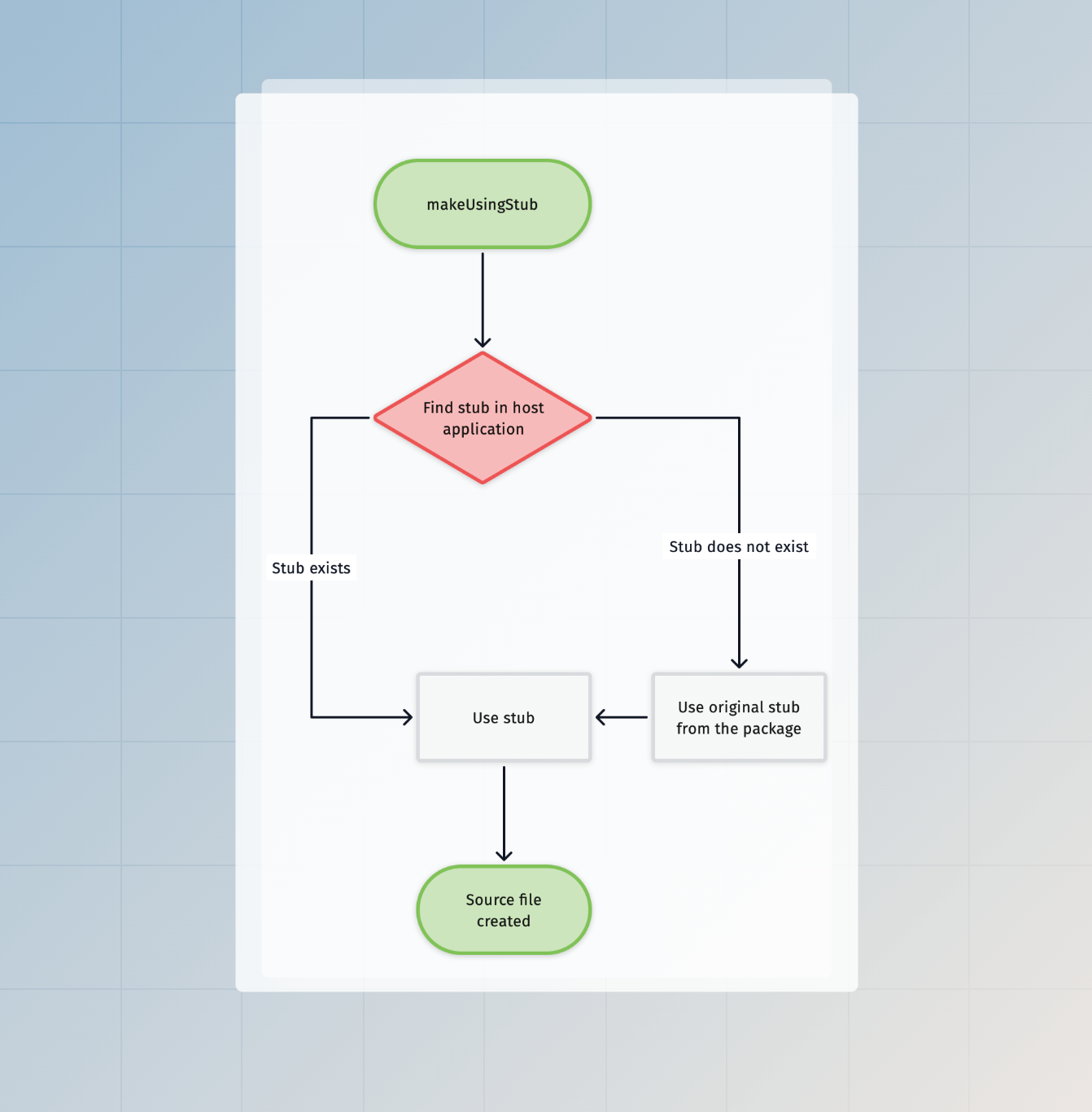
When you call makeUsingStub, the following happens:
- AdonisJS first checks for an ejected stub in the host project's
stubsdirectory - If not found, it uses the original stub from your package
- The stub template is processed with Tempura, evaluating all variables and expressions
- The
exports()function determines the output path - The generated file is written to the destination
Codemods API reference
The codemods API provides methods for common application setup tasks. All methods are available on the instance returned by command.createCodemods().
AST-based codemods rely on AdonisJS's default file structure and naming conventions. If you've made significant changes to your project structure, some codemods may not work as expected.
addImportAlias
Add a
package import
to the host application's package.json. The alias is added only when it does not already exist. Existing aliases and their targets remain unchanged. This method preserves the file's indentation and line endings, and does not require @adonisjs/assembler.
import type Configure from '@adonisjs/core/commands/configure'

export async function configure(command: Configure) {
  const codemods = await command.createCodemods()
  await codemods.addImportAlias(
    '#channels/*',
    './app/channels/*.js'
  )
}
This adds the following entry to the imports object in package.json:
{
  "imports": {
    "#channels/*": "./app/channels/*.js"
  }
}
createDirectory
Create a directory relative to the host application's root. The method creates missing parent directories and leaves an existing directory and its contents unchanged. It does not require @adonisjs/assembler.
import type Configure from '@adonisjs/core/commands/configure'

export async function configure(command: Configure) {
  const codemods = await command.createCodemods()
  await codemods.createDirectory('app/channels')
}
updateRcFile
Register providers, commands, meta files, and command aliases in adonisrc.ts.
await codemods.updateRcFile((rcFile) => {
  rcFile
    .addProvider('@adonisjs/lucid/db_provider')
    .addCommand('@adonisjs/lucid/commands')
    .setCommandAlias('migrate', 'migration:run')
})
Output:
import { defineConfig } from '@adonisjs/core/app'

export default defineConfig({
  commands: [
    () => import('@adonisjs/lucid/commands')
  ],
  providers: [
    () => import('@adonisjs/lucid/db_provider')
  ],
  commandAliases: {
    migrate: 'migration:run'
  }
})
defineEnvVariables
Add environment variables to .env and .env.example files.
await codemods.defineEnvVariables({
  REDIS_HOST: 'localhost',
  REDIS_PORT: '6379',
})
To omit the value from .env.example (useful for secrets), use the omitFromExample option:
await codemods.defineEnvVariables({
  API_KEY: 'secret-key-here',
}, {
  omitFromExample: ['API_KEY']
})
This inserts API_KEY=secret-key-here in .env and API_KEY= in .env.example.
defineEnvValidations
Add validation rules to start/env.ts. The codemod does not overwrite existing rules, respecting any customizations the user has made.
await codemods.defineEnvValidations({
  leadingComment: 'Cache environment variables',
  variables: {
    CACHE_STORE: 'Env.schema.string()',
    CACHE_TTL: 'Env.schema.number.optional()',
  }
})
Output:
import { Env } from '@adonisjs/core/env'

export default await Env.create(new URL('../', import.meta.url), {
  /**
   * Cache environment variables
   */
  CACHE_STORE: Env.schema.string(),
  CACHE_TTL: Env.schema.number.optional(),
})
registerMiddleware
Register middleware to one of the middleware stacks: server, router, or named.
// Router middleware
await codemods.registerMiddleware('router', [
  {
    path: '@adonisjs/core/bodyparser_middleware'
  }
])

// Named middleware
await codemods.registerMiddleware('named', [
  {
    name: 'auth',
    path: '@adonisjs/auth/auth_middleware'
  }
])
Output:
import router from '@adonisjs/core/services/router'

router.use([
  () => import('@adonisjs/core/bodyparser_middleware')
])

export const middleware = router.named({
  auth: () => import('@adonisjs/auth/auth_middleware')
})
registerJapaPlugin
Register a Japa testing plugin in tests/bootstrap.ts.
await codemods.registerJapaPlugin(
  'sessionApiClient(app)',
  [
    {
      isNamed: false,
      module: '@adonisjs/core/services/app',
      identifier: 'app'
    },
    {
      isNamed: true,
      module: '@adonisjs/session/plugins/api_client',
      identifier: 'sessionApiClient'
    }
  ]
)
Output:
import app from '@adonisjs/core/services/app'
import { sessionApiClient } from '@adonisjs/session/plugins/api_client'

export const plugins: Config['plugins'] = [
  sessionApiClient(app)
]
registerPolicies
Register bouncer policies in app/policies/main.ts.
await codemods.registerPolicies([
  {
    name: 'PostPolicy',
    path: '#policies/post_policy'
  }
])
Output:
export const policies = {
  PostPolicy: () => import('#policies/post_policy')
}
registerVitePlugin
Register a Vite plugin in vite.config.ts.
await codemods.registerVitePlugin(
  'vue({ jsx: true })',
  [
    {
      isNamed: false,
      module: '@vitejs/plugin-vue',
      identifier: 'vue'
    }
  ]
)
Output:
import { defineConfig } from 'vite'
import vue from '@vitejs/plugin-vue'

export default defineConfig({
  plugins: [
    vue({ jsx: true })
  ]
})
installPackages
Install npm packages using the project's detected package manager.
await codemods.installPackages([
  { name: 'vinejs', isDevDependency: false },
  { name: '@types/lodash', isDevDependency: true }
])